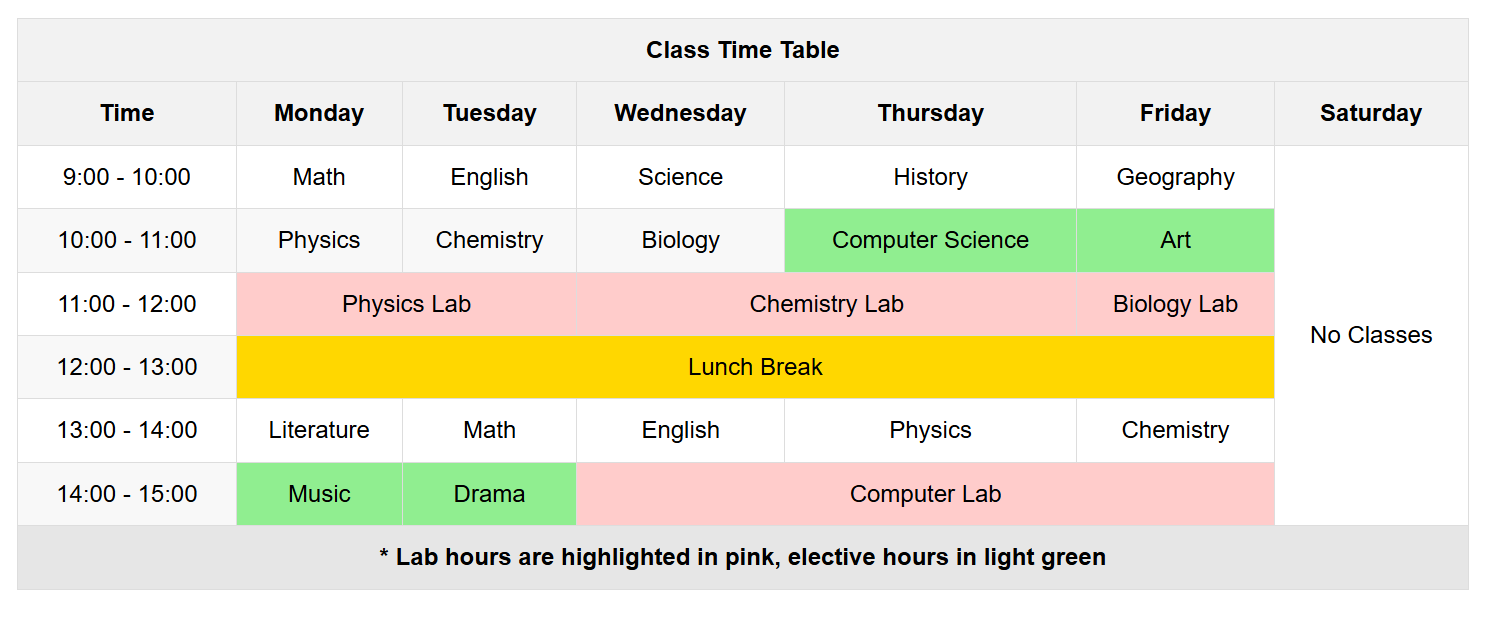
<!DOCTYPE html>
<html lang="en">
<head>
<meta charset="UTF-8">
<meta name="viewport" content="width=device-width, initial-scale=1.0">
<title>Time Table</title>
<style>
        body {
          font-family: Arial, sans-serif;
          line-height: 1.6;
          margin : 0;
          padding : 20px;
        }
        table {
            width: 100%;
            border-collapse: collapse;
        }
        th, td {
            border: 1px solid #ddd;
            padding: 8px;
            text-align: center;
        }
        th {
            background-color: #f2f2f2;
        }
        .lab-hours {
            background-color: #ffcccb;
        }
        .elective-hours {
            background-color: #90ee90;
        }
        .lunch {
        background-color: #ffd700;
        }
        .odd-row {
            background-color: #f8f8f8;
        }
        tfoot {
            background-color: #e6e6e6;
            font-weight: bold;
        }
    </style>
</head>
<body>
    <table>
        <thead>
            <tr>
                <th colspan="7">Class Time Table</th>
            </tr>
            <tr>
                <th>Time</th>
                <th>Monday</th>
                <th>Tuesday</th>
                <th>Wednesday</th>
                <th>Thursday</th>
                <th>Friday</th>
                <th>Saturday</th>
            </tr>
        </thead>
        <tbody>
            <tr>
                <td>9:00 - 10:00</td>
                <td>Math</td>
                <td>English</td>
                <td>Science</td>
                <td>History</td>
                <td>Geography</td>
                <td rowspan="6">No Classes</td>
            </tr>
            <tr class="odd-row">
                <td>10:00 - 11:00</td>
                <td>Physics</td>
                <td>Chemistry</td>
                <td>Biology</td>
                <td class="elective-hours">Computer Science</td>
                <td class="elective-hours">Art</td>
            </tr>
            <tr>
                <td>11:00 - 12:00</td>
                <td class="lab-hours" colspan="2">Physics Lab</td>
                <td class="lab-hours" colspan="2">Chemistry Lab</td>
                <td class="lab-hours">Biology Lab</td>
            </tr>
            <tr class="odd-row">
                <td>12:00 - 13:00</td>
                <td class="lunch" colspan="5">Lunch Break</td>
            </tr>
            <tr>
                <td>13:00 - 14:00</td>
                <td>Literature</td>
                <td>Math</td>
                <td>English</td>
                <td>Physics</td>
                <td>Chemistry</td>
            </tr>
            <tr class="odd-row">
                <td>14:00 - 15:00</td>
                <td class="elective-hours">Music</td>
                <td class="elective-hours">Drama</td>
                <td class="lab-hours" colspan="3">Computer Lab</td>
            </tr>
        </tbody>
        <tfoot>
            <tr>
                <td colspan="7">* Lab hours are highlighted in pink, elective hours in light
green</td>
            </tr>
        </tfoot>
    </table>
</body>
</html>